
If you built an Amazon affiliate site on WordPress over the past decade, you probably embedded hundreds of SiteStripe product boxes. Text links, image links, text-plus-image blocks. They were fast to create and they converted. Then Amazon changed the rules, and publishers with large archives faced a real infrastructure problem: broken images, dead embeds, and revenue sitting on pages that still rank.
We built Lasso’s SiteStripe import tool for exactly that scenario. It scans your site, finds every legacy SiteStripe embed, and converts them to Lasso displays powered by Amazon’s Product Advertising API. One bulk action replaces what would otherwise be weeks of manual edits across posts and pages.
Updated 2026.
1Key Takeaways
- Lasso includes a one-click import tool that finds Amazon SiteStripe links on your WordPress site and converts them into Lasso displays backed by Amazon’s API.
- Install Lasso, open the Import menu, and run Bulk Import. Lasso identifies SiteStripe embeds (including iframe-based image blocks) and replaces them sitewide.
- Standard SiteStripe text links still work, but image and text-plus-image formats from the old workflow need migration if you have not updated them yet.
For operators running the Amazon affiliate program at scale, link infrastructure is not a nice-to-have. It is the layer that keeps commissions flowing when platforms change terms underneath you.
2Why SiteStripe Broke for Image Embeds
The shift happened in November 2023. Amazon announced that two SiteStripe features, Image and Text+Image, would no longer be available after December 1, 2023. Links created with those formats would stop working by December 31, 2023.

Amazon’s message was direct:
“On December 1, 2023, two of the SiteStripe features “Image” and “Text+Image” will no longer be available.
Links created on your site using Image and Text+Image will stop working December 31, 2023.
Please remove them from your content as soon as possible if you have not already done so to avoid broken images on your site. Please note that standard text links from SiteStripe will continue to be available and work appropriately.”
For operators with thousands of embedded product boxes, that deadline was stressful. Every broken iframe on a ranking post sends a bad signal to readers and kills click confidence. You are not just losing a commission on that placement. You are teaching visitors that your recommendations are outdated.
Standard SiteStripe text links survived the change. If your site only uses plain text affiliate links from SiteStripe, you may not need a full migration. But most product-focused affiliate sites leaned on image embeds because they convert better than naked URLs. That is the gap this guide addresses.
3The Problem With Manual Fixes
The obvious fix is opening every post and replacing embeds by hand. That works when you have ten articles. It does not work when you have five hundred.
SiteStripe image code often lives inside iframes buried in classic editor blocks, page builders, or old reusable content. Finding every instance means searching the database, checking draft revisions, and hoping you did not miss a sidebar widget from 2019. Miss one cluster of embeds and you still have broken product images on live traffic.
Manual replacement also means re-generating each product display through SiteStripe or the Amazon API one product at a time. Then you paste new HTML into each post, clear cache, and spot-check the front end. Repeat until your backlog is gone. That is not a strategy. It is a part-time job.
We built the import workflow because we saw this pattern across affiliate operators we talk to every week. The bottleneck was never traffic. It was keeping monetized placements alive when the underlying embed format changed.
4What Lasso’s SiteStripe Import Actually Does
Lasso’s import tool is the one-click path out of this problem. Here is what happens under the hood when you run it:
- Lasso scans your website for SiteStripe links and embeds, including iframe-based image code
- Each embed converts to a Lasso display that pulls product data through Amazon’s API
- All matching links and embeds update in a single batch, without custom code or find-and-replace scripts
The result is API-backed product images and displays that stay current as Amazon updates pricing, availability, and creative assets. You are not patching dead iframes anymore. You are running the same infrastructure layer we use across our own affiliate properties.
If you want a broader look at how Lasso handles Amazon workflows beyond SiteStripe migration, read our Amazon affiliate WordPress plugin guide. It covers displays, link inventory, and the day-to-day operations that matter once your embeds are fixed.
5The 3-Step Guide To Importing Your Amazon SiteStripe Links
Here is the exact process. Read the three steps below, or follow along in the Lasso dashboard once you are logged in.
1. Install the Lasso Plugin on Your WordPress Site
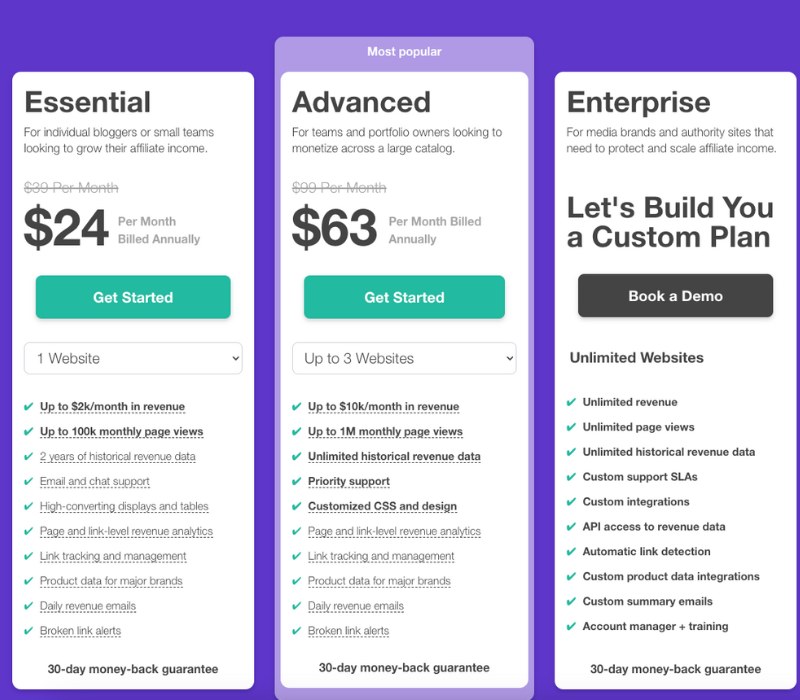
Choose your plan, select how many sites you want Lasso on, then download the plugin and enter your product key to activate your license. Once activated, Lasso is live on your site.
On version 322 and above, Lasso automatically scans your site for links powered by SiteStripe and logs them in your link database. You do not need to run a separate audit first. Install, activate, and Lasso starts building the import list in the background.
Connect your Amazon API credentials in Lasso settings if you have not already. The import tool relies on the same API layer that powers Lasso product displays. Without API access, you cannot pull fresh product images and metadata for the converted embeds.
2. Click the Import Button
Open the Import drop-down in the Lasso section of your WordPress sidebar.

The Import menu shows your full list of importable links. That list includes every Amazon SiteStripe affiliate link Lasso detected on your site. It also surfaces importable links from other plugins Lasso supports, including AAWP, ThirstyAffiliates, and Pretty Links. If you are switching from one of those tools, you can migrate in the same workflow.
From here, click a single link to import it individually, or click Bulk Import to convert every SiteStripe embed at once. Bulk Import is what most operators want. It replaces all instances of SiteStripe image code across your site and imports them into Lasso as API-powered displays.

Give the batch a minute on large sites. Lasso is rewriting embeds in place, not just adding new shortcodes alongside broken ones. When it finishes, spot-check a handful of high-traffic posts to confirm displays render correctly on mobile and desktop.
3. Verify, Then Move On
Once the import completes, your SiteStripe image embeds should render as Lasso displays backed by Amazon’s API. Pricing, images, and availability update through the same system Lasso uses for new product boxes you create going forward.
Walk through your top ten revenue pages first. Confirm the product image loads, the affiliate link resolves, and the display matches your theme settings. If something looks off on a single post, fix it in Lasso’s link editor rather than reverting the whole batch.
After verification, shift your focus to net-new opportunities. Broken embeds were a maintenance fire. Unmonetized mentions in content that already ranks is usually the bigger revenue leak. That is where we see the largest gains once infrastructure is stable.
6Importing From Other Affiliate Plugins
The Import menu is not SiteStripe-only. If you previously ran AAWP, ThirstyAffiliates, or Pretty Links, Lasso can pull those links into one inventory with the same bulk workflow.
Consolidating plugins matters for operators building at scale. One dashboard for link groups, display themes, and performance tracking beats juggling three separate tools that each handle one slice of the workflow. For a comparison of how the major Amazon plugins stack up, see our roundup of best Amazon affiliate WordPress plugins.
7What To Do After Migration
SiteStripe migration is a one-time fix for a platform change that already happened. The forward-looking work is making sure your link layer stays healthy as you publish new content.
Run periodic checks on out-of-stock products. Amazon delists items without warning, and a dead product box on a page that ranks is the same conversion problem as a broken SiteStripe iframe, just with a different cause. Lasso surfaces unavailable products so you can swap or remove them before readers hit a dead end.
Use consistent display formats across your site. Mixed embed styles from different eras look sloppy and erode trust. Once everything runs through Lasso, you control theme colors, CTA copy, and layout from one settings panel.
Track which placements actually earn. Migration gets your infrastructure current. Optimization is what turns current infrastructure into higher revenue per click. That starts with knowing which pages and products drive commissions, not just which posts get traffic.
8The Bottom Line
Amazon platform changes are not surprises anymore. They are recurring market shifts that reward publishers who treat affiliate links as infrastructure, not one-off HTML pasted into a post editor.
If you still have SiteStripe image embeds on your WordPress site, you do not need a manual cleanup project. Install Lasso, open Import, and run Bulk Import. The tool scans, converts, and updates in one batch.
Once your embeds are fixed, run an Opportunities Scan on the content you already published. Most operators find product mentions sitting without affiliate links in posts that already rank. Fixing those placements is often the fastest path to higher revenue without writing a single new article.

Jamie I.F.
Jamie heads up marketing at Lasso, runs a portfolio of niche sites, and tweets a lot about affiliate marketing and SEO.