
If you run a WordPress site and
WordPress ships with a built-in Links Manager. Many bloggers use it by default and never look elsewhere. For serious affiliate operators, that default tool often falls short. These seven plugins do the job better.
Updated 2026.
I have been running affiliate sites for over nine years. Link management is one of those boring layers that either saves you hours or costs you
1In a Hurry? Our Favorites
If you just want the short list before the full breakdown:
- Lasso: All-in-one affiliate link management, displays, broken-link alerts, and opportunity detection. This is what we built for operators who treat monetization like a system, not a pile of plugins.
- Linker: Simple cloaking and vanity URLs on your domain, with click tracking through Google Analytics.
- ThirstyAffiliates: A long-standing favorite for cloaking and reusing affiliate links across WordPress. Popular, though the interface feels dated compared to newer tools.
- Pretty Links: Widely used for cloaking and prettier URLs. Important caveat: do not cloak Amazon links with Pretty Links, or you risk an account ban.
The full comparison of all seven alternatives is below.
2Why Link Management Matters
Links are how readers move through your site and how search engines understand your content. Manage them well and you get cleaner analytics, better navigation, and more affiliate revenue. Manage them poorly and you chase ghosts in your traffic reports.
Accurate analytics starts with how links behave. Forced new-window openings can skew session data and make it harder to see which pages actually convert. That does not mean you should never open links in a new tab. It means you should choose deliberately, especially on outbound affiliate links where you want readers to stay on your article.
There is no magic number of links per page. Every link you add should earn its spot. Junk backlinks and thin reposts still hurt credibility. Dynamic linking, on the other hand, keeps readers engaged. Internal links keep people on your site. External links let you explain a concept without bloating the article. For a deeper look at how we think about affiliate link management at scale, that post covers the operator playbook.
3Link Basics
There is a lot to know about links. Here is the condensed version.
Internal Links
Internal links move readers from one page on your site to another page on the same site. They help visitors navigate, establish information hierarchy, and support ranking around topic clusters.
Best practice: use descriptive anchor text so readers know what they are clicking into.
External Links
An external link sends readers to another website. When other sites link to you, those backlinks can lift your rankings. In SEO, external links pointing to your page generally carry more weight than your own internal links. That is why backlink building still matters.
How Links Open
You have two main choices: open in a new tab or open in the same window. New tabs keep readers on your current page while they visit the destination. Same-window navigation sends them away and forces a back-button return.
For keeping readers on your content while they check a recommendation, new-tab behavior is usually the better call for outbound links.
Anatomy of a Hyperlink
Search engines read links in a predictable structure:
- Anchor tag: Opens the link element and signals that a hyperlink follows.
- Hyperlink referral (href): The URL inside the quotation marks. It can point to a page, an image, or a downloadable file.
- Anchor text: The clickable words readers see, often styled as a link.
- Link tag closure: Ends the link element for crawlers.
4WordPress Links Manager
WordPress powers a huge share of the web, and for good reason. It is flexible, well supported, and mature enough to run serious publishing businesses on.
Out of the box, WordPress includes a Links Manager in the admin panel. From there you can add, edit, and remove links. There is also a sidebar widget to display links, and you can work with links through the dedicated API.
For hobby blogs, that may be enough. For affiliate marketers managing hundreds of URLs across years of content, it usually is not. You need cloaking, click tracking, category grouping, compliance guardrails, and a way to find what broke without opening every post by hand.
A Link Inventory at Your Fingertips
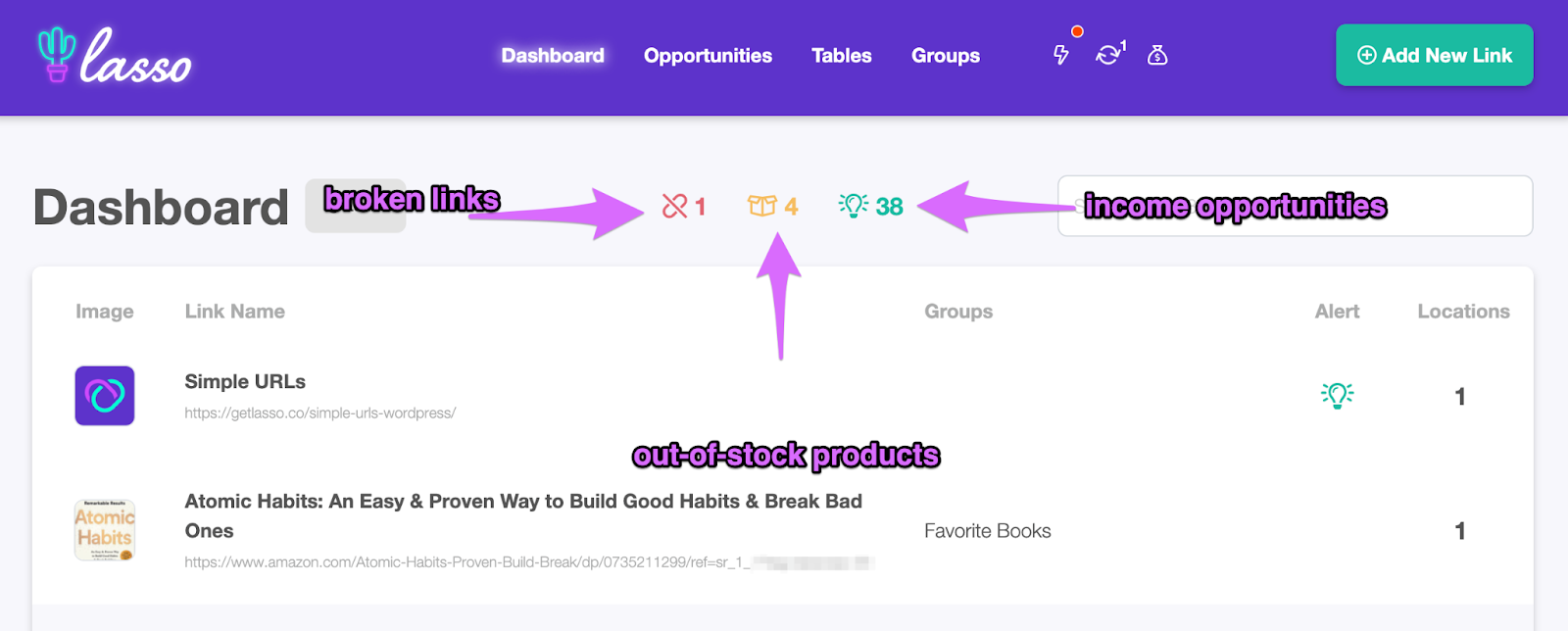
That is the gap dedicated plugins fill. Lasso, for example, builds a searchable database of every URL on your site. You can spot broken links, out-of-stock products, and new affiliate opportunities without hunting through posts manually.
A Link Inventory at Your Fingertips
Lasso creates a database of every URL on your site that you can access easily in a searchable dashboard. Here’s where you’ll see links that are broken, out-of-stock, or where there’s a new affiliate opportunity.
Run an Opportunities Scan on your site and you will see what I mean. Most operators find unmonetized product mentions or stale URLs on the first pass. That is revenue sitting in archives you already wrote.
57 Alternatives to the WordPress Links Manager
If your needs have outgrown the default WordPress tool, these seven plugins are the better options worth comparing.
Lasso
Lasso is a link management system built for affiliate publishers, but it goes well beyond basic link storage. With Lasso you can:
- Create custom link displays
- Monetize unused links and keywords
- Get updated Amazon product information
- Get notified of broken links
- Track clicks
- Create vanity links
- Organize and sort links and build display grids or lists on your pages
We built Lasso because juggling separate plugins for links, displays, and opportunity detection stopped making sense on our own sites. If you want the full reasoning, read 7 reasons Lasso is the best WordPress affiliate plugin. Pairing strong link infrastructure with thoughtful product display optimization is where conversion gains compound.
Lasso is the only tool you need for affiliate marketing. Increase sales, manage links, and access higher commission rates on Amazon.
If you want to earn more affiliate income and grow your niche site, you need Lasso!

Linker
Linker generates short links on your domain and tracks external link clicks through Google Analytics.
With Linker you can also:
- Create vanity URLs using your domain
- Redirect links to any inbound or outbound location using 301 redirects
- Set up tracking
Linker is a solid pick if you want lightweight cloaking and GA-based click data without a full monetization stack.
Urlink
Urlink lets you manage links and group them by category or tags. Each link can use direct or redirect mode, and you can choose new-tab or same-window behavior.
With Urlink you can also:
- Add link thumbnails
- Customize redirect and direct settings
- See total clicks for each link
- Use meta key ordering
Urlink fits publishers who want organized link libraries with visual thumbnails and flexible redirect behavior.
ThirstyAffiliates
ThirstyAffiliates helps affiliate marketers
With ThirstyAffiliates you can also:
- Group links into categories
- Choose from 301, 302, or 307 redirects
- Uncloak links to stay inside affiliate partner terms
It has been around a long time. The feature set covers the basics well, though operators running large catalogs often outgrow it.
Shorty Pro
Shorty Pro is a WordPress plugin focused on optimizing and automating clicks for more conversions.
It also offers:
- Conversion tracking
- Affiliate network integration
- Conversion timeline
- Geolocation
Shorty Pro targets publishers who care as much about conversion paths as link storage.
Pretty Link Pro
Pretty Link Pro helps you create vanity URLs for your website, social posts, and offline materials.
With Pretty Link Pro you can also:
- Name custom slugs for your URLs
- Track total clicks per link
- Track unique clicks per link
- View click details
The free Pretty Links plugin is what many people know first. Pretty Link Pro adds the deeper analytics and slug control power users need. Same Amazon warning applies: do not cloak Amazon links.
ShortLink Analytics
ShortLink Analytics generates short links and tracks visitors.
With ShortLink Analytics you can also:
- Track unique visitors
- View statistics by browser, OS, country, and city
- Filter statistics by date, day of week, month, or custom range
If your primary need is short-link generation with granular visitor breakdowns, this plugin covers that niche.
6Manage Your Links, Not Your Plugins
There is such a thing as installing too many plugins. Not all of them are high quality, and each one adds load to your stack. To replicate everything Lasso gives you in one place, you would need to install, manage, and often pay for several separate tools.
That is time and
Link management should feel like infrastructure: searchable, compliant, and connected to how your content actually earns. Start with a plugin that matches your scale today and leaves room for growth tomorrow.
Ready to replace the WordPress Links Manager with something built for affiliate revenue? Get started with Lasso and run an Opportunities Scan on your site. Most publishers find quick wins in the first pass.

Jamie I.F.
Jamie heads up marketing at Lasso, runs a portfolio of niche sites, and tweets a lot about affiliate marketing and SEO.